What's a nerd box?
Nerdbox is a small box that you can plug into any tv to
play thousands of classic video games, using usb
controllers. It is a small Linux powered computer, based on the
Raspberry Pi board.
What are all the different versions?
Currently there are only two versions,
the Standard Nerdbox, and the Everything Nerdbox. The Nerdbox has 22 systems, and 8584
games, all listed on the games page. The Everything has all of
that, plus the Playstation and Arcade games. The Everything costs more, because of the
added hardware required, and you will need to figure out controllers if you would like
ones similar to the Playstation. In the past, there was a system called the Nerdbox Orange
(back then, the standard Nerdbox was called the Nerdbox Blue). The Orange ran 8 systems,
and came with NES controllers. It was based on slower hardware, so it could not run
anything newer than the NES and the Gameboy. It was not popular, as the Blue (now the
Nerdbox), was just much better value. The Nerdbox Orange cannot be upgraded.
PS1 games are cool! Can I play multi disk games like Final Fantasy 7?
Of
course! Here is a guide for changing CDs.
What kind of video output does it use?
Nerdbox uses HDMI for video output.
HDMI output? Sounds fancy, and modern. What about the original aspect ratio?
Since Nerdbox is a small computer, it will output at your television's standard
resolution. The games will be displayed in their native aspect ratio, exactly as if you were
playing the original cartridge. The scaling is done perfectly, without the use of
anti-aliasing, and this looks great on all modern televisions and projectors. It seems to
be pretty intelligent about defaulting to a good resolution for your display as well.
We've tested it with projectors, modern TVs, and computer monitors.
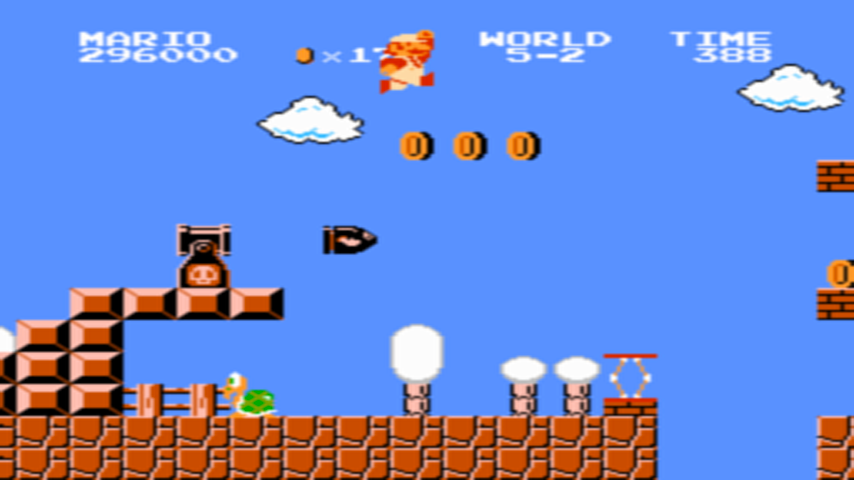
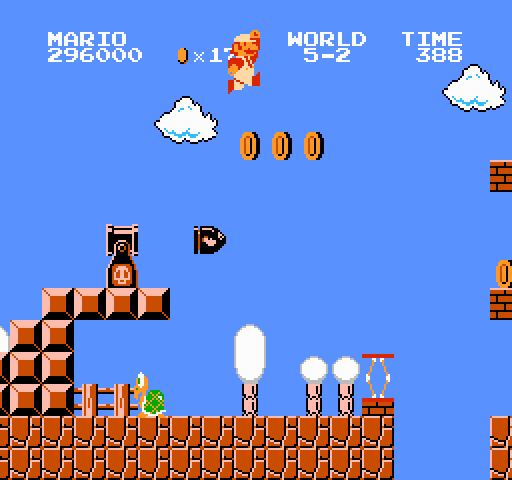
For people who do not know what aspect ratio or scaling can do, here are two screenshots. The first is what Mario looks like through a system that scales and stretches, the second is what Mario looks like on Nerdbox. The second is also what it looks like through an actual NES console, on a TV from that era.
Which game consoles are supported?
Nerdbox supports 22 or 24 different
systems. The complete list is here.
Which controllers can I use?
Really any usb controller can work,
here is a guide to configure your own. I include 2 SNES style
controllers with each Nerdbox, because a lot of these games are fun with two players. If
you have a controller already that you'd like to use, chances are, it will work using
this guide. Nerdbox also supports Bluetooth controllers.
What about wireless controllers?
Wireless controllers that connect via
some sort of USB dongle seem to work great (ie the XBox 360 controllers). Bluetooth
controllers also work well, but can be annoying to configure.
What about vintage NES/SNES/Genesis/Atari/whatever controllers?
There are
many USB adaptors for old controllers available on the internet. I've heard that these
all work well with Nerdbox, however I haven't had a chance to test any of them myself.
Just to be clear, the light guns require a CRT screen to work, even with original
hardware, so chances are, even with a USB dongle, these will not work.
How does Nerdbox compare to the cheaper systems I've seen advertised on social
media and even sold in some stores?
Nerdbox was built to behave exactly the
same as the original systems. I made sure to use powerful enough hardware, and quality
controllers. I also went to great lengths to build a very large selection of working
games. I did not include any strange bootleg versions of popular titles. Many of the
cheaper systems suffer from speed issues, are filled with questionable versions of games,
have less games, break quickly, have no warranty/support, have a frustrating interface,
or worst of all, scale their video, stretching the games out and making them different
from the original versions. With Nerdbox, you will feel like you are playing real
cartridges, on your modern tv. It looks and plays exactly the same. At first I assumed
that this was a given, but after trying many of these other consoles, I'm amazed at how
bad they are. Nerdbox just does it all properly!
Can I use accessories like the light gun, power pad, etc?
Not easily.
There are usb convertors for popular systems available out there that will allow you to
connect these accessories to the Nerdbox, however I have not tested them. These
convertors are apparently great ways to use classic controllers with Nerdbox. Having
said all of this, the light guns for all of these systems will not work with anything but
a crt based television, even with original gaming system hardware. This was a limit with
the original technology and depresses me greatly.
How do save games work?
Basically the same as they do with the original
cartridges. So, if you have to die in The Legend of Zelda to save, same deal. If you
need to find a save point in Final Fantasy III, same deal. Nerdbox also supports save
states, which allows you to take a snapshot of where you are in the game. Read about
those here.
How do I get one?
Check out the buy page.
Why didn't you include my favourite game?
Very probably, because I forgot.
Ask me to include it with your system, and I probably can. I will likely also add it to
the system, so that everyone else can enjoy it as well.
Can I add my own games?
Yes. There is a guide for this
here, but I would always prefer you suggest a game that you love,
so that I can add it to the base system for everyone else to enjoy. Also, if your base
system ever needs to be restored for some reason, you will lose any additions you've
made.
Why did you not include N64/Intellivision/Commodore 64 games?
The simple
answer: because the controllers for those systems are pretty different from the standard
controllers on most other retro systems. None of those systems really make sense with a
SNES controller. Also, for N64, a lot of the games do not emulate very well, even on a
full desktop computer. If a game does not run perfectly, I'd rather not have it on
Nerdbox. Having said that, some users have used the instructions
for loading their own games to add games from these systems themselves. Combine that with
usb controllers from Amazon, or other parts of the internet, and some of these games work
great!